


📡 Facebook Won’t Open on Mobile Data but Works on Wi-Fi: Understanding the APN and IPv6 Handover Error
If you ever notice that Facebook refuses to open when you are using mobile data but suddenly works perfectly the moment you connect to Wi-Fi, you are encountering one of the most misunderstood mobile networking problems today. This situation is often blamed on weak signal, app bugs, or even Facebook itself, yet in real diagnostic scenarios the root cause almost always lives much deeper in the mobile network stack, specifically in a misalignment between APN configuration and IPv6 handover behavior 📱🌐.
I want to walk you through this topic slowly and thoroughly, not as a checklist of random fixes, but as a coherent explanation that mirrors how this issue actually behaves in the real world, because once you understand the mechanics behind APN profiles and IPv6 transitions, the symptoms stop feeling random and the solution becomes surprisingly logical 😊.
🔍 Definition: What Does “Facebook Works on Wi-Fi but Not on Mobile Data” Really Indicate?
When Facebook fails exclusively on mobile data while functioning normally on Wi-Fi, it tells us something very specific: your device hardware, the Facebook app itself, and Facebook’s servers are all operating correctly. The failure occurs only when your phone communicates through your carrier’s mobile core network, which uses a completely different routing, addressing, and tunneling system than your home or office Wi-Fi.
Mobile networks rely on APNs (Access Point Names) to decide how your traffic is routed, whether IPv4, IPv6, or dual-stack is used, and how handover between radio cells and gateways is managed. When this configuration is even slightly off, modern apps like Facebook, which rely on persistent encrypted connections, can fail silently. It feels as if the app is “blocked,” but in reality the connection never completes its negotiation 🧩.
📌 Why This Problem Matters More Than You Think
Facebook is often the first app to break in these scenarios because it aggressively adopts modern networking standards such as HTTPS with strict TLS enforcement, QUIC, and IPv6-preferred routing when available. Many simpler apps still fall back to IPv4 automatically, masking underlying mobile network misconfigurations. Facebook, on the other hand, expects the network to behave correctly and consistently.
This is why users frequently say, “Everything else works on mobile data except Facebook,” which from an engineering standpoint is not a coincidence at all. It is a classic sign of an IPv6 handover failure combined with an improperly provisioned APN, where packets leave your device but return traffic never arrives in a usable form ⚠️.
🧠 How APN and IPv6 Handover Errors Are Created
An APN defines how your phone connects to the internet through your carrier. It controls IP version preference, authentication method, proxy behavior, and routing policies. Many carriers now deploy IPv6-only or IPv6-preferred APNs with IPv4 delivered through translation mechanisms such as NAT64 or 464XLAT.
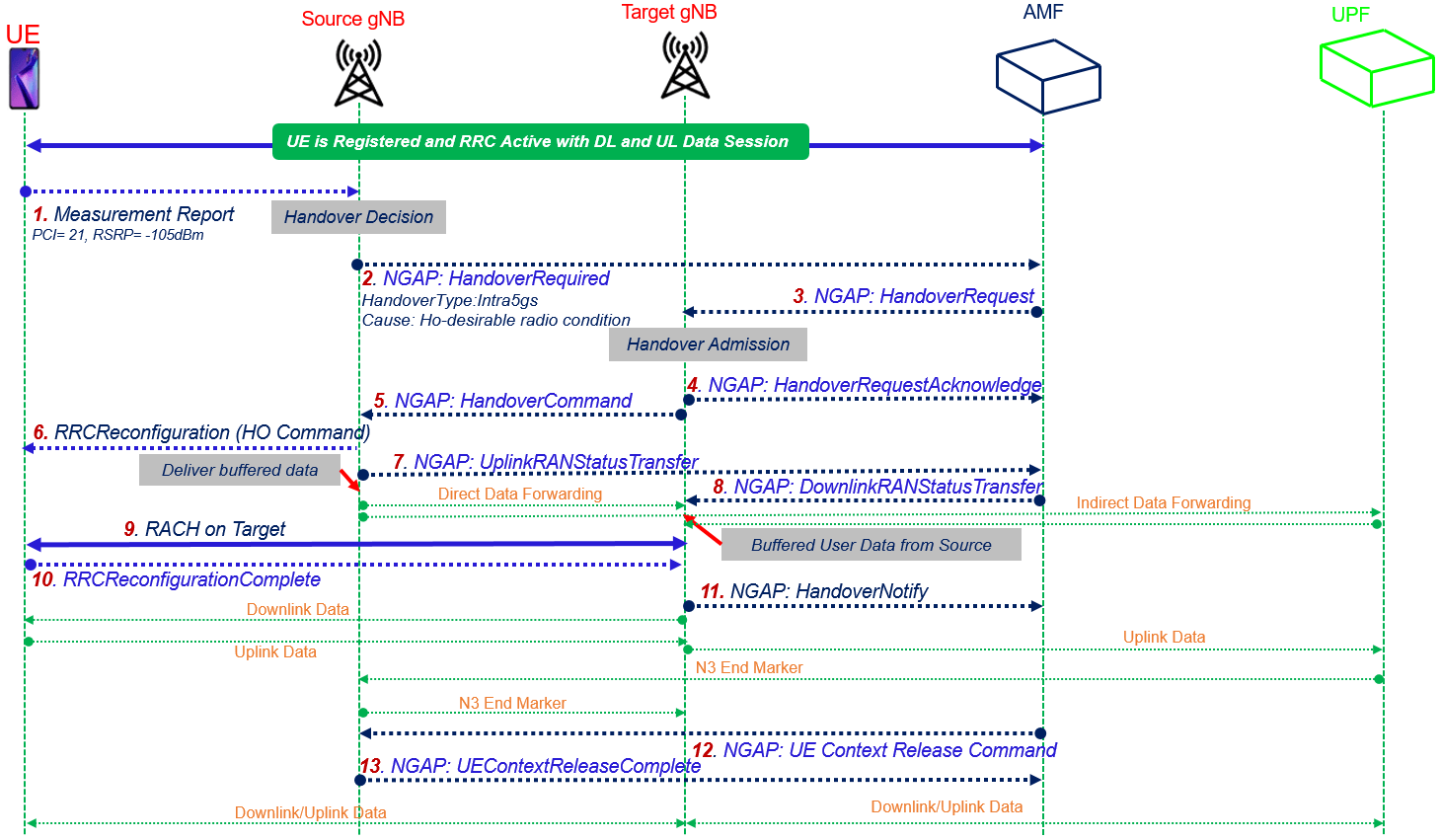
Problems arise when the device believes IPv6 is available and stable, but the network fails during handover between radio cells or gateways. During this transition, Facebook’s encrypted session may attempt to continue over IPv6, while the network momentarily drops or misroutes return packets. Because Facebook uses long-lived connections, it does not immediately retry on IPv4, resulting in a stalled app that appears “offline” even though signal strength is excellent 😶🌫️.
This issue becomes even more common when users move between LTE and 5G, or when the phone switches between carrier aggregation states, because the IP session must be preserved seamlessly for apps like Facebook to remain connected.


🛠️ How to Fix the Issue Step by Step (With Intent, Not Guesswork)
The most effective fixes focus on restoring predictable routing rather than forcing the app to adapt endlessly. Start by opening your mobile network settings and reviewing the APN profile currently in use. In many cases, switching from an automatically provisioned APN to a manual APN configured for IPv4/IPv6 dual stack or IPv4 only immediately resolves the problem. This forces the device to avoid unstable IPv6 paths during handover.
Next, temporarily disable IPv6 at the device level if your operating system allows it, or select an APN that does not advertise IPv6 capability. This is not a permanent condemnation of IPv6, but a practical workaround for carriers whose IPv6 deployment is incomplete or inconsistent.
Finally, toggle airplane mode or reboot the device to force a fresh PDP context establishment. This ensures the phone negotiates a new IP session cleanly, rather than attempting to reuse a broken one 🔧.
📊 A Real-World Example From Daily Diagnostics
I once worked with a user whose Facebook app stopped loading every time they left home Wi-Fi, yet WhatsApp and basic browsing continued to work. Signal strength was excellent, and the carrier insisted there was no outage. After inspecting the APN, we noticed it was IPv6-only. Switching to a dual-stack APN instantly restored Facebook connectivity. The user described it as “Facebook suddenly breathing again,” which is a surprisingly accurate metaphor for how persistent connections behave when routing stabilizes 😊.
📈 Metaphor That Makes It Click
Imagine your data as a train traveling through tunnels. Wi-Fi gives you a straight, well-lit tunnel with clear tracks. Mobile data sends your train through a series of tunnels that occasionally change size mid-route. IPv6 handover errors are like tunnels that suddenly narrow without warning. Facebook’s train, longer and heavier than most, simply cannot pass through unless the tunnel dimensions remain consistent 🚆➡️🕳️.
❓ Frequently Asked Questions (FAQ)
- Why does Facebook fail only on mobile data?
Because the mobile core network handles IP routing differently from Wi-Fi, and Facebook is sensitive to routing instability. - Is this caused by poor signal?
No, signal strength does not guarantee stable IP handover. - Does resetting network settings help?
Sometimes, because it forces APN re-provisioning. - Is IPv6 the problem itself?
Not inherently, but incomplete IPv6 deployments often trigger this issue. - Why do other apps still work?
Many apps fall back to IPv4 more aggressively than Facebook. - Does switching to 4G from 5G help?
In some cases, yes, because it reduces handover complexity. - Is this an Android-only issue?
No, it appears on iOS and Android alike. - Can carriers fix this permanently?
Yes, by stabilizing IPv6 handover and APN profiles. - Does using a VPN solve it?
Often temporarily, because it bypasses carrier routing quirks. - Is this dangerous or insecure?
No, it is a connectivity issue, not a security breach.
🤔 People Also Ask
Why does Facebook load indefinitely on mobile data?
Because the encrypted session never completes due to routing failure.
Can APN settings really affect apps this much?
Yes, APN defines the entire data path.
Is dual-stack better than IPv6-only?
In unstable networks, yes.
Why does toggling airplane mode help?
It forces a clean IP session renegotiation.
Should I call my carrier?
Only if manual APN adjustment is unavailable.
✅ Final Thoughts
When Facebook refuses to open on mobile data but works flawlessly on Wi-Fi, the issue is rarely mysterious once you look beyond the surface. An APN mismatch combined with IPv6 handover errors creates a perfect storm where modern, persistent applications simply stop functioning. By understanding how mobile networks route data and how Facebook expects that routing to behave, you gain control over the problem instead of chasing random fixes. And when Facebook finally opens again on mobile data, it feels less like luck and more like a well-earned victory over an invisible but very real network challenge 😌📶.
You should also read these…
- tugmen.com – gut%e2%80%91healthy smoothie recipes for beginners
- olddry.com – twitter x muted words too aggressive fine tuning a
- sixrep.com – tiktok action could not be completed warning
- huesly.com – tiktok verification code not coming to email
- spyfrogs.com – the data you dont see what x collects from you in
- noepic.com – twitterx weak ad delivery improve with targeting c
- soturk.com – locked accounts on game platforms steam epic
- sixrep.com – cop30 outcomes in plain english what changed for a
- godwig.com – how to pay off credit card debt fast 5 strategies
- toojet.com – instagram location and map strategy for businesses