

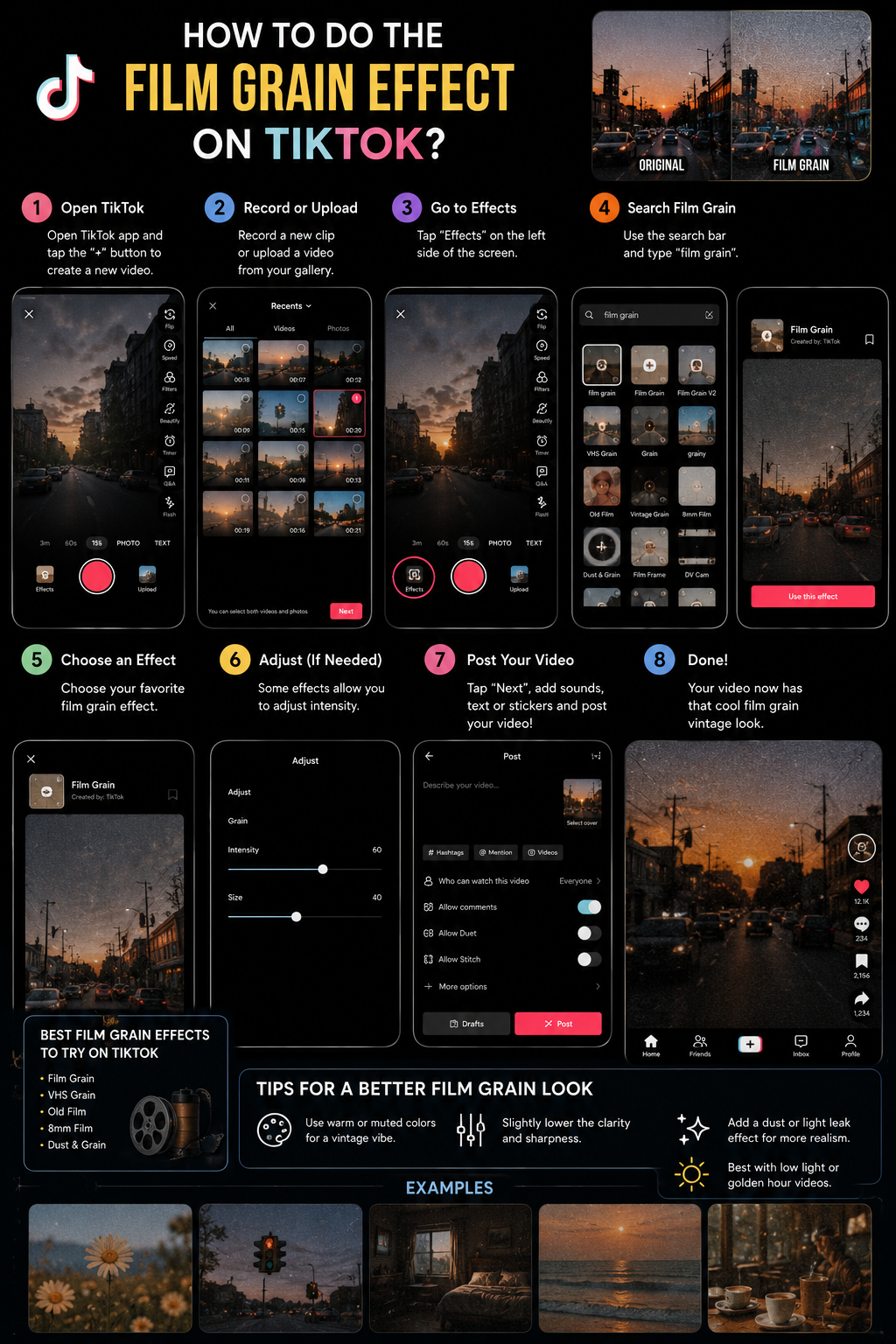

You can create the film grain effect directly inside TikTok by using filters and effects, although the exact names and availability of those tools can change according to your country, device, account, and application version, or you can prepare the effect in an external editor such as CapCut before uploading the finished video to TikTok. TikTok’s official guidance explains that creators can apply certain effects before or after recording, while filters can be added before or after recording or uploading, and their strength can be adjusted with the intensity slider, which means the native TikTok editor can produce a simple grain inspired look even when a specific effect called “Film Grain” does not appear in your account. TikTok’s official effects and filters guide provides the current platform instructions for accessing these tools.
What Is the Film Grain Effect? 🎬
Film grain is the visible texture created by microscopic particles in photographic film, and although digital cameras do not naturally produce exactly the same structure, video editors recreate it with animated noise, scanned film overlays, digital grain effects, and carefully controlled color treatment. A film grain overlay is therefore not simply a static photograph filled with dots; authentic looking grain changes from frame to frame, moves naturally across bright and dark areas, and blends with the footage rather than sitting over it like an obvious transparent pattern.
The easiest way to understand film grain is to imagine the visual difference between a perfectly smooth glass table and a handmade wooden table. The glass surface may look clean, modern, and precise, but the wood carries small variations, lines, textures, and irregularities that give it character. Film grain performs a similar role in video. It does not necessarily make footage technically sharper or cleaner, but it can make the image feel richer, warmer, more tactile, and more emotionally expressive 🌟.
Film grain should not be confused with poor quality digital noise. Uncontrolled digital noise often appears in badly lit smartphone footage as unpleasant colored pixels, especially in dark areas, while intentional film grain normally has a more balanced, organic, and visually consistent structure. The aim is not to destroy the video quality; the aim is to introduce a controlled texture that supports the atmosphere of the content.
Why Is Film Grain Important on TikTok?
TikTok users move rapidly from one video to another, and much of the footage they encounter has similar characteristics, including strong sharpness, bright lighting, smooth skin, high saturation, automatic stabilization, and bold digital filters. Film grain can interrupt that visual pattern because it makes a video look less like standard smartphone content and more like a deliberately styled piece of visual storytelling. This distinction can be especially valuable for fashion creators, musicians, photographers, filmmakers, cafés, restaurants, travel accounts, beauty brands, vintage stores, lifestyle creators, artists, and businesses that want to communicate personality rather than presenting only technically perfect footage.
Grain can also help create emotional context. When viewers see soft texture, faded colors, subtle flicker, and warm highlights, they may associate the image with cinema, childhood recordings, old photographs, music videos, disposable cameras, or earlier decades. The footage may have been recorded yesterday, but the visual treatment can make it feel like a memory, and that emotional transformation is one of the main reasons the effect works so well on TikTok 💛.
However, the effect is most successful when it supports the message of the video. Adding heavy grain to a clear product demonstration may hide important details, while adding subtle grain to a fashion montage, travel diary, music performance, wedding video, personal story, or behind the scenes clip can make the content feel intentional and distinctive. The visual style must serve the story, not compete with it.
Film Grain Styles You Can Use
| Grain Style | Visual Character | Best TikTok Uses | Recommended Strength |
|---|---|---|---|
| Fine cinematic grain | Soft, elegant, and barely noticeable | Fashion, beauty, products, restaurants, and professional storytelling | Low |
| 16mm inspired grain | Textured, organic, and independent film inspired | Music, street videos, travel, interviews, and artistic content | Low to medium |
| 8mm home movie grain | Coarse, nostalgic, warm, and imperfect | Family moments, holidays, summer memories, and retro storytelling | Medium |
| Distressed old film | Visible dust, scratches, flicker, and aged texture | Horror, history, experimental videos, and dramatic concepts | Medium to high |
| Black and white grain | Classic, documentary inspired, and emotional | Portraits, poetry, music, interviews, and reflective stories | Low to medium |
CapCut’s official guide describes several common grain approaches, including coarser 8mm textures, more balanced 16mm textures, finer 35mm inspired looks, high resolution grain, and distressed overlays containing scratches or other imperfections. These categories are useful because they remind creators that film grain is not one universal texture; the correct type depends on the subject, resolution, mood, lighting, and visual identity of the video. CapCut’s film grain overlay guide also emphasizes adjusting intensity carefully so the texture does not overwhelm important details.
Method One: Add Film Grain Directly in TikTok
The fastest approach is to search TikTok’s native Effects library. Open the TikTok application, tap the plus button at the bottom of the screen, and either record a new video or prepare to upload an existing clip. Tap Effects on the camera screen and search or browse for visual styles related to film, vintage footage, grain, retro cinema, analog cameras, old movies, 8mm film, 16mm film, dust, scratches, or cinematic texture.
Effect names change frequently, and an effect that appears for one account may not appear for another, so do not depend on one exact name. Try several related search terms, preview every effect under your actual recording conditions, and save promising options to your Favorites so you can access them again. TikTok notes that some effects work only before recording, while others can be added afterward, so testing the effect before creating the complete video prevents unnecessary editing problems.
Step by Step TikTok Method
- Open TikTok and tap the plus button.
- Tap Effects before recording, or upload your prepared footage.
- Search for terms such as film grain, 8mm, 16mm, old film, vintage movie, analog, dust, or cinematic.
- Preview several effects because their texture, brightness, flicker, and color treatment may differ considerably.
- Record a short test rather than immediately recording the full video.
- Check whether faces, product details, subtitles, and darker areas remain visible.
- Record or upload the final clips.
- Open the Filters panel and choose a softer, warmer, faded, or cinematic filter when necessary.
- Use the filter strength slider to reduce the intensity until the result looks natural.
- Add sound, captions, text, and a suitable cover before posting.
The most common mistake at this stage is choosing the strongest available grain effect because it looks impressive during a one second preview. When the same texture remains on screen throughout a twenty second video, however, it can become distracting. Begin with a restrained intensity, watch the complete TikTok at normal phone size, and increase the grain only when the footage still looks too digitally clean.
Method Two: Build the Film Look with TikTok Filters
You may not always find a dedicated grain effect that suits your footage, but you can still create a film inspired appearance by combining TikTok’s filters with the natural texture already present in your recording. TikTok officially allows filters to be added before or after recording or uploading, and the filter strength slider provides a practical way to control how strongly the selected color style affects the image.
Choose a filter that slightly lowers digital brightness, softens excessive saturation, warms skin tones, fades black areas, or gives highlights a creamier appearance. The goal is not to make every color orange or brown; realistic film inspired grading normally preserves natural skin tones and important product colors while gently changing contrast and overall atmosphere. Use the slider rather than accepting the default filter strength, because many filters become more convincing when applied at a lower intensity.
You can also improve the film impression during recording by avoiding harsh overhead light, using softer window light, allowing a little natural camera movement, and including textures such as fabric, wood, stone, water, old furniture, printed photographs, streets, lamps, and shadows. A digital filter works much better when the original scene already contains visual qualities associated with cinema or photography.
Method Three: Create Film Grain in CapCut
CapCut provides a more controlled workflow because you can add grain to a timeline, change its duration, adjust intensity, combine it with color grading, and review the result before uploading it to TikTok. According to CapCut’s official instructions, desktop users can import footage, search the Effects library for “Grain,” drag the effect onto the timeline, and adjust its intensity in the settings panel before exporting or sharing the finished video.
CapCut Film Grain Workflow
- Open CapCut and create a new vertical project.
- Import your TikTok footage and place it on the timeline.
- Trim unnecessary moments and arrange the clips before applying visual effects.
- Open the Effects section.
- Search for Grain, Film Grain, Noise, Old Film, 8mm, or 16mm.
- Drag the chosen effect over the video clips.
- Extend or shorten the effect layer according to the desired duration.
- Reduce the effect intensity until facial details and important objects remain clear.
- Adjust exposure, contrast, saturation, temperature, highlights, shadows, fade, and sharpness.
- Export the finished video and upload it to TikTok.
A Balanced Color Recipe for Film Grain
There is no universal set of numerical values that works for every video because lighting, camera settings, skin tones, clothing, and locations differ, but a practical starting point is to lower contrast slightly, reduce saturation by a small amount, soften excessive sharpness, raise faded black levels, warm the image gently, and reduce very bright highlights. After making these adjustments, add the grain last so you can judge how the texture interacts with the finished color grade.
Fine grain works better for clean fashion, restaurant, beauty, and product footage because it adds texture without hiding details, while coarser grain can suit music performances, street scenes, summer diaries, nostalgic family clips, and experimental storytelling. CapCut advises creators to consider purpose, intensity, resolution, consistency between shots, audience, and genre when selecting a grain treatment, which is a sensible framework for any TikTok project.
Method Four: Use a Film Grain Overlay
A film grain overlay is a separate video containing animated grain, dust, scratches, or flicker that you place above your original footage. This method can produce a more realistic result because the grain texture moves independently from the main video. Import both the original footage and the overlay into an editor, place the overlay on the upper track, change its blend mode when the editor provides that option, and reduce its opacity until it becomes part of the image rather than an obvious second layer.
When the overlay has a black background with bright dust and scratches, a lightening blend mode such as Screen may work well, while neutral gray overlays may work better with Overlay or Soft Light. The names of these modes vary between applications, but the principle remains the same: remove or blend the overlay background while preserving its animated texture.
Always confirm that you have permission to use the overlay, particularly when the TikTok supports a commercial brand, sponsored campaign, client, or monetized project. A texture being available online does not automatically mean it is licensed for every commercial purpose, so use properly licensed assets and retain the license information when the project has business value.
Film Grain Editing Diagram
Video Idea
    ↓
Record Vertical Footage
    ↓
Select and Trim Clips
    ↓
Correct Exposure and White Balance
    ↓
Apply Film Inspired Color Grade
    ↓
Add Fine or Coarse Grain
    ↓
Adjust Grain Intensity
    ↓
Add Music, Text, and Captions
    ↓
Review at Phone Size
    ↓
Export and Upload to TikTok
How to Record Better Footage for the Film Grain Effect
Film grain looks most convincing when you plan the recording style before editing. Record several short clips rather than one long uninterrupted shot, and include a combination of wide scenes, medium shots, close facial expressions, moving hands, clothing details, reflections, signs, food, architecture, shadows, and environmental textures. This variety gives the edit rhythm and allows the grain to support a story rather than becoming the only interesting visual element.
Use soft natural light whenever possible because extreme darkness can produce uncontrolled smartphone noise that competes with intentional grain. Window light, cloudy outdoor light, sunset, shaded streets, lamps, and indirect interior lighting often create smoother tones that accept film grain beautifully. Avoid relying entirely on automatic beauty enhancement and excessive sharpening, because these tools can create an unnatural conflict between highly processed faces and textured backgrounds.
Small handheld movements can make footage feel personal and cinematic, but uncontrolled shaking will not become attractive simply because grain has been added. Move slowly, keep your elbows close to your body, follow the subject deliberately, and allow a little organic movement without losing composition. The camera should feel human, not careless 📹.
A Practical TikTok Example
Imagine that you want to create a fifteen second TikTok about an evening in a quiet café. You record the entrance sign, coffee being poured, a close view of a book, light reflecting on the table, a friend smiling, and the street outside after sunset. You arrange these clips in a gentle rhythm, add a warm color treatment, reduce sharpness slightly, place fine animated grain over the entire sequence, and use a stronger dust or flicker effect for only half a second at the beginning.
The result feels much more believable than placing an aggressive old film preset over one continuous shot. The grain supports the wooden tables, warm lamps, steam, shadows, and reflective mood, while the short opening flicker suggests an old projector beginning to run. The viewer experiences a miniature memory instead of simply seeing a filter demonstration ☕🎞️.
A Practical Editing Anecdote
One pattern I repeatedly look for when reviewing a grain edit is whether the creator has used texture to strengthen the footage or to hide weak footage. In an early version, creators often add heavy grain, scratches, blur, flicker, light leaks, faded colors, and camera shake simultaneously because every individual effect appears attractive in the editing menu. When all of them play together, however, the viewer can no longer see the face, product, location, or story clearly.
The strongest revision usually involves removing most of those layers, keeping one consistent fine grain texture, preserving a restrained color grade, and using a stronger imperfection only at one or two intentional moments. This editing experience teaches an important lesson: film grain should behave like the texture of paper under a drawing, not like a curtain covering the drawing.
Common Film Grain Mistakes
Using Too Much Grain
Heavy grain may look attractive in a paused frame, but animated grain becomes much more noticeable during playback. Reduce the intensity until viewers feel the texture without constantly thinking about it.
Adding Grain Before Correcting Exposure
Correct brightness, color temperature, highlights, and shadows first. Grain should be one of the later creative decisions because it becomes difficult to evaluate when the underlying footage is still improperly exposed.
Using Static Noise
A single still noise image can appear frozen and artificial. Realistic film grain should move and change between frames, so animated effects or video overlays usually produce more convincing results.
Applying Different Grain to Every Clip
Unless the style deliberately changes between scenes, inconsistent grain size and intensity can make the edit feel disconnected. Use one primary texture across the TikTok and reserve stronger variations for purposeful transitions.
Making Dark Footage Dirtier
Smartphone footage recorded in very low light may already contain digital noise. Adding coarse grain without first reducing or managing the original noise can make faces and backgrounds difficult to understand.
Forgetting the Story
Film grain is an aesthetic tool, not a complete content idea. A simple but meaningful sequence with subtle grain usually performs better visually than random clips covered by an intense effect.
People Also Asked
Can you add film grain directly on TikTok?
Yes, you can search TikTok’s Effects library for film, grain, analog, 8mm, old movie, and similar terms, or combine a suitable filter with naturally textured footage. The exact effects available may differ between accounts and regions.
Why can I not find the film grain effect on TikTok?
The effect may have been renamed, removed, restricted to certain regions, or made available only for specific devices or application versions. Update TikTok, try related search terms, and consider using CapCut when you need a consistent workflow.
Does film grain lower video quality?
Film grain intentionally adds texture, but properly applied grain should not make the video unreadable. Excessive grain, low resolution exports, repeated compression, and dark footage can create the impression of poor quality.
What is the difference between film grain and noise?
Film grain imitates the organic structure associated with photographic film and is added deliberately, while digital noise commonly results from sensor limitations, insufficient light, or high sensitivity settings. Their visual patterns and emotional associations are different.
Is CapCut better than TikTok for film grain?
CapCut generally provides more control over intensity, timing, overlays, color grading, and consistency, while TikTok is faster for simple effects and spontaneous posts. The better option depends on how much customization the project requires.
Frequently Asked Questions
1. Which TikTok search terms work best for finding grain effects?
Search for film grain, old film, 8mm, 16mm, cinema, analog, retro movie, dust, vintage camera, projector, and scratched film. Testing several related phrases improves your chance of finding a suitable effect.
2. How strong should film grain be on a TikTok video?
For most fashion, travel, food, beauty, and lifestyle videos, grain should remain subtle enough that viewers can still see facial features, text, clothing, food, and product details. Increase the intensity only when a coarse vintage aesthetic forms part of the concept.
3. Should I add grain before or after color grading?
Complete basic exposure correction and most color grading before adding grain. This order makes it easier to judge the final texture and prevents later adjustments from making the grain unexpectedly harsh.
4. Does film grain work with bright daylight footage?
Yes. Fine grain can give bright daylight footage a softer and more cinematic appearance, especially when you reduce harsh highlights, control saturation, and avoid excessive digital sharpness.
5. Which grain style is best for product videos?
Use fine cinematic or 35mm inspired grain at low intensity because products usually need clear edges, accurate colors, readable labels, and visible materials. Coarse grain may hide information customers need.
6. Which grain style is best for nostalgic videos?
An 8mm or 16mm inspired texture works well for family memories, holidays, birthdays, vintage clothing, summer diaries, and home movie concepts, particularly when combined with warm colors and gentle handheld movement.
7. Can I add scratches without adding grain?
Yes, but scratches alone may look artificial because aged film generally contains a mixture of grain, dust, flicker, exposure variation, and occasional physical damage. Use scratches sparingly and combine them with a softer underlying texture.
8. Why does my grain disappear after uploading to TikTok?
Very fine grain can become less visible after video compression, especially in dark, flat, or low resolution footage. Use a slightly clearer grain pattern, export at good quality, and avoid repeatedly saving the video through multiple applications.
9. Should subtitles appear above or below the grain?
For maximum readability, add subtitles after creating the film look so the text remains clean. When you want the text to feel physically embedded in the footage, apply subtle texture to it without reducing legibility.
10. Can brands use film grain in TikTok advertisements?
Yes. Brands can use grain to communicate craftsmanship, nostalgia, creativity, authenticity, luxury, youth culture, or cinematic storytelling, but the effect should not hide the product, logo, offer, demonstration, or required advertising information.
Conclusion
Creating the film grain effect on TikTok is not simply a matter of covering a video with visible noise. A convincing result begins with well planned footage, appropriate lighting, meaningful composition, controlled color grading, and a grain texture that complements the subject rather than hiding it 🎞️✨. TikTok’s native effects and adjustable filters provide a fast solution for casual posts, while CapCut gives creators more control over grain type, duration, intensity, overlays, and the overall cinematic appearance.
The most important principle is moderation. Fine grain can make modern footage feel warm, tactile, emotional, and visually distinctive, while excessive grain can obscure faces, products, text, and storytelling. Start with a low intensity, review the entire video on a phone screen, compare the edited version with the original, and remove any effect that does not improve the mood or message.
When used thoughtfully, film grain becomes more than a popular TikTok effect. It becomes a visual language that helps a recent moment feel like a remembered one, gives clean digital footage a human texture, and turns a collection of short clips into a small cinematic experience that viewers can emotionally recognize and remember 💫.